Every device, one view
Sessions, terminals and files from your laptop, desktop and servers side by side. Everything works on a session that lives on another machine.
Alpha · for Claude Code and Codex
Ponte runs a small daemon on each of your computers and joins them into one private, end-to-end encrypted mesh. Start, watch and steer Claude Code and Codex sessions on any of them — from one dashboard in your browser, or from your phone.
$ curl -fsSL https://get.ruiming.me | shmacOS and Linux · arm64 and x64 · one executable, no Node.js or Bun required


Drives the agent CLIs you already use, signed in with your own accounts
Features
Whichever machine a session runs on, it shows up in the same place and works the same way — reading, replying, approving, reviewing.
Sessions, terminals and files from your laptop, desktop and servers side by side. Everything works on a session that lives on another machine.
Keep running claude or codex in your own terminal. Ponte picks those sessions up — no wrapper, no alias — so you can follow and answer them from anywhere.
Permission requests and agent questions reach every device you're signed in on, and push notifications reach your phone. Answer wherever you are.
Slip a message into the running turn, queue the next prompts, or interrupt and send. The queue lives with the session, so closing the tab loses nothing.
Open real terminals on any device from the browser or your phone. They keep running when your connection drops.
Diffs against HEAD, the branch or a single turn; line comments that go back to the agent; commit, push and open a pull request. Give each task its own worktree.
Search session titles, folders and messages across all your devices from one box.
Sessions Ponte starts get tools to run commands and read files on your other machines, hand a task to an agent there, and notify your phone when they're done.
See the 5-hour and weekly limits of every agent on every device, and switch between your saved Claude and Codex accounts per device.
Ponte doesn't ask you to change how you work. It installs hooks into Claude Code and joins Codex's shared app-server, so the sessions you open by hand appear in the dashboard as they run.
codex TUI has open.
Sign your phone in by scanning a QR code — no domain, tunnel or port forwarding. Add Ponte to the home screen and it behaves like an app.

Open a shell on any of your devices right from the dashboard — the build box, the Mac under the desk — over the same encrypted mesh, with no SSH keys to copy and no ports to open.
feno shell-init), get a notification when a long command finishes.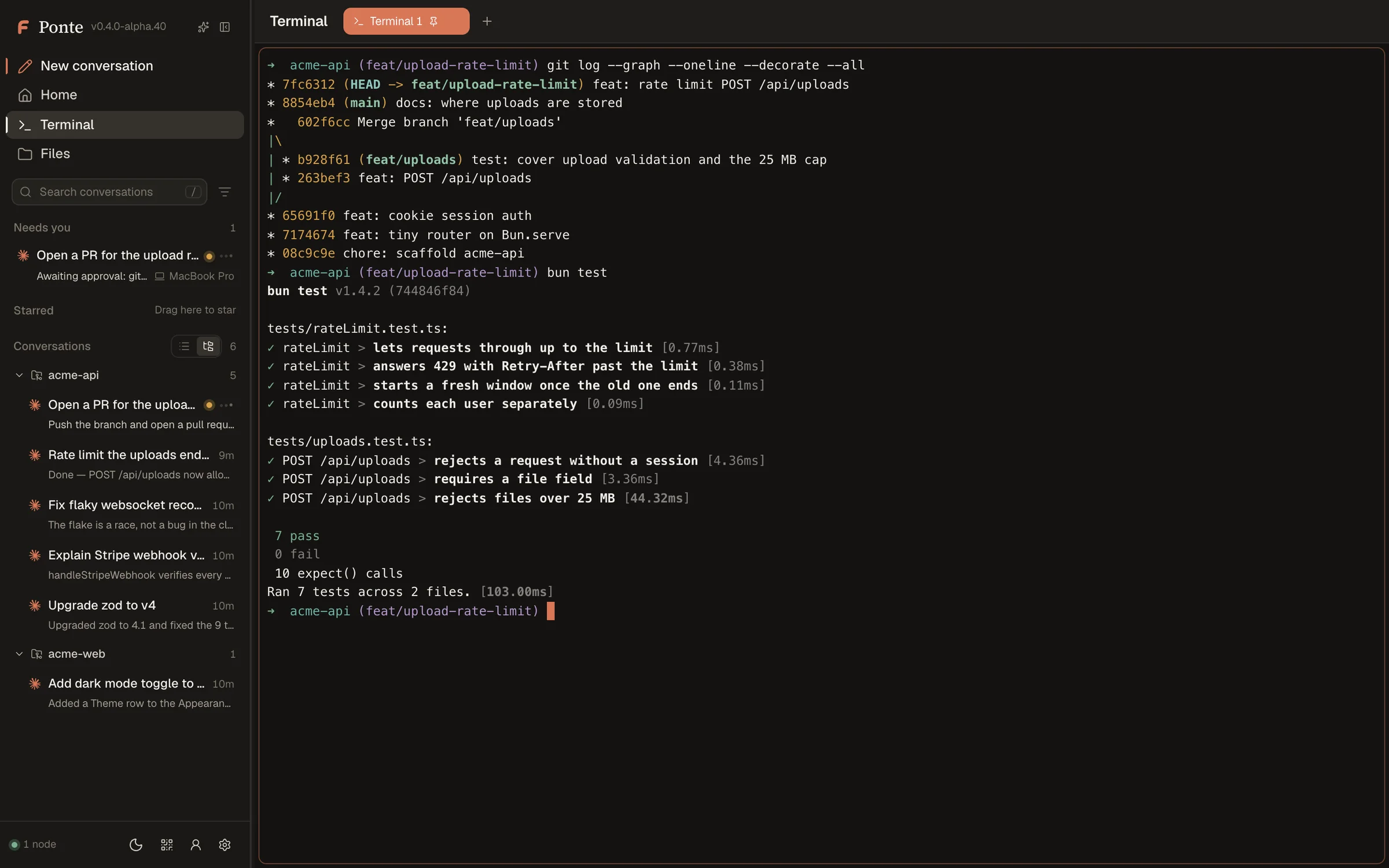
How it works
One feno daemon runs on each device. Devices talk to each other directly when they can and through a relay when they can't — encrypted end to end either way.
Devices authenticate each other with their own keys and encrypt every frame (X25519, AES-256-GCM). Your browser talks to its device over a Noise channel pinned to that device's key.
Devices on different networks meet through a relay that only forwards ciphertext — Ponte's by default, or your own with feno relay serve or feno relay deploy cloudflare. On the same network they connect directly. No VPN, no port forwarding.
A new device joins with a one-time pairing link that you approve on one you already have; both show the same confirmation code. Remove a device and it's locked out.
There is no Ponte account and no cloud copy. Transcripts and files stay on the device that has them; the dashboard only listens on localhost.
Get started
One command per computer. Ponte drives the Claude Code and Codex CLIs you already have, signed in with your own accounts.
Downloads the feno executable and checks its checksum, starts it as a background service (launchd or systemd) and signs your browser in to the dashboard at localhost:23513.
$ curl -fsSL https://get.ruiming.me | shfeno open signs a browser in again. If anything looks off, feno doctor checks the install, the service and every agent, and says how to fix each problem.
On a device that already runs Ponte, click Pair device (the QR icon in the sidebar) or run feno pair. It shows one command for the new computer that installs Ponte there and joins your devices; approve it where you started, once both show the same code.
$ feno pair # on a device you already have
$ curl -fsSL https://get.ruiming.me | FENO_JOIN='feno://pair?d=…' sh # on the new one
Scan the QR code and confirm — your phone is signed in to your devices. Add the page to your home screen to get notifications.
$ feno setup phoneCommand line
What the dashboard does across devices is a feno command away — every command speaks --json, with exit codes made for scripts and agents.
feno status -wWatch this device and the devices it's connected to.feno openSign this computer's browser in to the dashboard.feno pairAdd a computer: prints its install-and-join command.feno setup phoneShow a QR code that signs a phone in.feno sessions prompt --node mini --agent claude --task "…"Prompt an agent on any device and wait for its turn to finish.feno sessions wait --session <id>Wait until a session is idle, failed or needs a person.feno exec --node devbox -- make testRun a command on another device, with its exit code.feno worktree createCreate a git worktree on any device.feno notify --title "Deploy done"Push a notification to your phone.feno doctorCheck the install, the daemon and every agent, with a fix for each problem.feno updateUpdate now. Ponte also updates itself daily, once no session is working.feno uninstallRemove Ponte; your data in ~/.feno stays unless --purge.feno --help lists every command; feno help-json prints the whole command tree as JSON. Exit code 9 means an agent is waiting on a person.
FAQ
Ponte is the product's new name. Its command-line tool, background service and data folder (~/.feno) still carry the earlier name, feno — same product.
No. Keep using them in your own terminal. Ponte adds hooks to Claude Code (2.1.83 or later) and joins the app-server that recent Codex versions share, so sessions you open after installing show up by themselves. A terminal session can be read, replied to and approved from Ponte, but only stopped from its terminal.
No. Ponte has no account and no cloud storage: sessions, transcripts and files stay on your devices. Your agents talk to Anthropic and OpenAI exactly as they would without Ponte.
No. It forwards encrypted frames between your devices and sees only their size and timing. When you open the dashboard through the relay's web address, the page itself is served by that relay — run your own relay if you'd rather not trust ours for that.
That's the normal case. Devices meet through the relay wherever they are, and switch to a direct connection when they can reach each other, such as on the same Wi-Fi.
The dashboard has a dedicated phone view that you sign in to with feno setup phone and add to your home screen. It installs like an app and gets push notifications. There is no App Store app.
Every device installs the newest build on its channel at 05:00, once no session it drives is working. Choose the stable or nightly channel per device, update any time with feno update, or turn it off with feno update auto off.
Ponte is alpha software. It runs every day on its author's machines, but expect rough edges and frequent updates — and keep feno doctor handy.
One command on each of your computers, and every session is a click away — at your desk or on your phone.
$ curl -fsSL https://get.ruiming.me | sh